


calisto06
-
Nbre de contenus
16724 -
Inscription
-
Dernière visite
-
Jours gagnés
430
Tout ce qui a été posté par calisto06
-
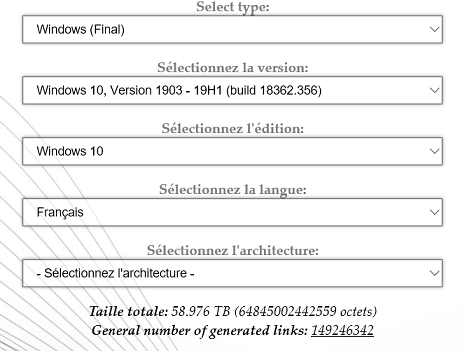
Tu as le process complet http://www.chantal11.com/2015/11/windows-10-mise-a-niveau-sans-perte-de-donnees-ni-applications-et-parametres-depuis-le-fichier-iso/ Dans ton cas tu peux choisir soit de garder la version 1903 et dans ce cas tu récupère l'iso ici https://tb.rg-adguard.net/public.php sélection ci dessous Ou bien tu peux choisir de changer et passer en 1909 , la manipulation est la meme . En ce qui concerne les données de toute manière il faut les sauvegarder sur un support externe meme si elles ne sont pas supprimées avec la manipulation (un crash du disque peut tout effacer)

-
Déconnecte le maximum de périphériques et vois ce qui se passe ...le disque a été vérifié avec Crystaldisk info portable ? http://www.gratilog.net/xoops/modules/mydownloads/singlefile.php?cid=226&lid=1911
-
vérifies que les touches qui activent le wifi ne sont pas à l'origine du probleme : For how-to's and troubleshooting information on Wired and Wireless networking, browse to the Dell Networking and Wireless Support Center. To turn the wireless antenna off or on, press and hold the Fn key, and then press the PrtScr key (repeating this will toggle the wireless antenna off and on). For more information on how to turn the wireless antenna on and off on a Dell Computer, refer to Dell Knowledge Base article How to Turn the Wireless Antenna On and Off on a Dell Computer.
-
Bonjour @Pierre27 , tu peux utiliser la réparation par mise à niveau qui ne supprime ni les données ni les logiciels . Il faut simplement exécuter le setup.exe de l'iso monté de ta version et de ton architecture , le systeme se réinstalle par dessus lui meme , il faut juste veiller à avoir assez de place pour le dossier Windows.old qui va se créer .
-
Bonjour @jojo89 installer les logiciels sur un disque secondaire est possible mais si ton disque secondaire est moins rapide ils ne bénéficierons pas de la vitesse du ssd et de toute manière il y a des fichiers qui vont s'installer dans les dossiers utilisateurs comme App data .
-
j'aime bien le fusil ….mais c'est un peu lourd ...je pense pouvoir en avoir l'usage...
-
Tu supprime la partition 1 sur le lecteur 0 (la partition 2 doit contenir les infos constructeurs avec des outils) pour obtenir un espace non alloué et tu le sélectionne pour l'installation Attention si tu dois récupérer des données tu peux encore le faire à l'aide du Notepad voir mon deuxième lien .
-

WordPress Bridge mis à jour
calisto06 a commenté un(e) billet du blog de Le Crabe dans Le blog du Crabe
Tu n'as pas compris mon propos : le fait d'exhiber cette grande "confiance" en soi publiquement je trouve justement que c'est souvent le signe du contraire dans la réalité . Pas sure qu'il l'idolâtre ...surtout depuis ces derniers temps ... A t'on besoin d'idolâtrer ou de vouloir ressembler ou s'identifier à quelqu'un pour se sentir exister ? J'aime bien quand tu parle des politiques Français ...parle nous des Belges plutôt pour qu'on vérifie si ils sont meilleurs ou pires -
WordPress Bridge mis à jour
calisto06 a commenté un(e) billet du blog de Le Crabe dans Le blog du Crabe
C'était donc ça ces bizarreries des nouveaux posts non visibles ... -
Teste les rams une par une avec memtest https://lecrabeinfo.net/tester-les-composants-de-son-pc-disque-dur-memoire-vive-carte-mere-alimentation.html
-
Bonjour @Mekju tu peux tenter l'installation en mode compatibilité : clic droit sur le fichier et onglet compatibilité
-
Tu désactive le démarrage rapide et tu vois pour la suite la vidéo , sur ta première photo floue on voit la séquence de boot . Ce réglage de mettre la clé USB en premier tu pourras le laisser ou le modifier une fois les réparation finies : attention au cas ou tu installe w10 il faudra la déconnecter avant le premier redémarrage .
-
crée un nouveau compte administrateur et installe les pilotes depuis ce compte .
-
Bonjour @GSffr , Je vais te donner le lien du tuto complet ou tu trouveras surement ce qu'il faut pour ton dépannage , la récupération de tes données etc ...si tu peux démarrer sur les options de récupération en éteignant et rallumant le PC au moins trois fois tu dois pouvoir restaurer d'un point de restauration si tu as pris la précaution d'en créer un avant tes essais https://community.lecrabeinfo.net/blogs/entry/13-tutoriel-complet-de-recuperation-et-dinstallation-de-windows-10-depuis-un-support-dinstallation/ Si tu ne peux pas restaurer des options de récupération tu peux tenter la reinitialisation depuis la clé w10 comme indiquée https://lecrabeinfo.net/reinitialiser-reinstaller-windows-10.html méthode 2 mais tu choisis l'option "Mise à niveau " .
-
Ah oui excuse moi ...c'est vrai que le scan ne peut se faire non connecté ...dslé Tu installe intel chipset device , puis les pilotes wifi
-
Eventuellement tenter de vider les condensateurs de la carte mère https://www.pro-lcds.com/fr/smartblog/6_Vider-les-condensateurs.html
-
Tu peux le faire en notant résolu en haut de ton post
-
Bonjour @pooks , que donne un scan avec l'outil TLD https://www.touslesdrivers.com/index.php?v_page=29 que tu peux récupérer sur USB . La page du support https://www.dell.com/support/home/us/en/19/product-support/product/inspiron-17-7786-2-in-1-laptop/drivers , installe le chipset intel puis les drivers concernant le wifi .
-
WordPress Bridge mis à jour
calisto06 a commenté un(e) billet du blog de Le Crabe dans Le blog du Crabe
Faut se méfier des gens qui se prennent trop au sérieux : c'est plutôt un signe de manque de confiance en soi et ça fait le lit de l'autoritarisme , les plus grands esprits arrivent à rire d'eux meme ce qui n'enlève rien à leurs compétences et à leur sérieux sur certains points . -
prochain achat : un bazooka ...ils en ont sur Amazon en Russie ?
-
Bonjour @GSffr , bienvenue sur le forum , Je t'invite à reformuler ta demande d'aide après la lecture de : https://community.lecrabeinfo.net/topic/3616-créer-un-sujet-les-règles-à-respecter/
-
Cree un point de restauration pour pouvoir revenir en arriere https://www.pcastuces.com/pratique/windows/restauration_systeme_w10/page1.htm et vois si le driver officiel s'installe .
-
@pilatus a plus que les bases …..mais perso je continue à proposer de faire la clé avec l'outil car elle est plus facile pour le néophyte .



 ….je préfère les habituels
.thumb.png.adf30389994f62b67207897975220a76.png)